Author: af

  • A small gotchya around jsonld 1.0, 1.1, and gen-delims from RFC3986

    I’m working on an exciting project which is the implementation of the SOSA standard, and as part of the project I wanted to use the envo ontology to provide context to the data contained therein.

    As part of the development process I manually write RDF/Turtle to be sure I have the relationships correct for a single vertical component, and then I write a corresponding response in JSON-LD. From there I check for isomorphism of the two graphs to ensure that the JSON-LD is correct. The main reason why I manually serialize the JSON-LD is that the automatic conversion to JSON-LD is hideous; a well designed JSON-LD response could be indistinguishable from a resful JSON API response, but with the additional inclusions of various fields like @context and @id which can be ignored by users who would rather parse the data as a JSON object.

    Now that I’ve set up the scene, let’s get to the gotchya. I was writing a JSON-LD response for a vertical component, and I wanted to include the envo ontology as part of the context. I had the following JSON-LD:

    {
      "@context": {
        "envo": "http://purl.obolibrary.org/obo/ENVO_",
        "skos": "http://www.w3.org/2004/02/skos/core#"
      },
      "@id": "http://example.com/concept1",
      "skos:prefLabel": "RIVER / RUNNING SURFACE WATER",
      "skos:closeMatch": "envo:00000022"
    }

    Which unfortunately serilaized to

    <http://example.com/concept1> <http://www.w3.org/2004/02/skos/core#closeMatch> "envo:00000022" .
    <http://example.com/concept1> <http://www.w3.org/2004/02/skos/core#prefLabel> "RIVER / RUNNING SURFACE WATER" .

    As you can see we don’t have the IRI of the envo object we expected (which would be http://purl.obolibrary.org/obo/ENVO_00000022).

    Turns out that JSON-LD 1.0 doesn’t support ending what in TTL is called @prefix when it doesn’t end in a gen-delim character as defined in RFC3986. tl;dr _s are out in prefixes with JSON-LD 1.0; however…

    JSON-LD 1.1 adopts the more permissive approach of IRI creation like RDF/TTL with a bit more in the context. By putting the prefix in an object’s @id, and setting a @prefix keyword to true, I finally got the result I wanted.

    {
      "@context": {
        "@version": 1.1,
        "envo": {
          "@id": "http://purl.obolibrary.org/obo/ENVO_",
          "@prefix": true
        },
        "skos": "http://www.w3.org/2004/02/skos/core#"
      },
      "@id": "http://example.com/concept1",
      "skos:prefLabel": "RIVER / RUNNING SURFACE WATER",
      "skos:closeMatch": "envo:00000022"
    }

    I may be breaking some backwards compatibility here; for example neither the JSON-LD Playground nor the EasyRDF Converter serialize it differently to the first example in n3; however the likes of rdflib 7.1.3 does.

    For me the JSON-LD “shape” is more important than giving supporting JSON-LD 1.0; and I can’t change the envo prefix. Necessity breeds breaking backwards compatibility.

  • csvcubed, a personal retrospective

    csvcubed is a tool for building CSV-W files. If you’re wondering what the hell CSV-W is, it’s basically CSV files with extra metadata that provides context and makes them play nice with linked data. It was born out of necessity when I was working on the ONS’s Integrated Data Service’s Dissemination service. Our end product was 5-Star Linked Data, and we needed a way to convert CSV files into RDF. I joined the project during the tail end of 2020 during lockdown as a data engineer and the pipeline for creating CSV-W was a bit of a mess but born of necessity.

    My onboarding at ONS was great – I was quickly indoctrinated into the power of linked data and the associated standards. My actual job though? Unfucking presentational spreadsheets that locked away most of ONS’s statistical publications. Who wants to unpivot data just to do analysis? Not me, and honestly not the analysts producing them either – nobody wants to do analysis on pivoted data.

    The tool I initially learned for generating CSV-W was databaker, which Sensible Code knocked together during a hackathon. It did the job of creating tidy data, but that was about it. Our pipeline was ultimately this Airflow-orchestrated mess: scrape a publication’s latest spreadsheet, use databaker to unpivot it, describe the data using something called gss-utils (to which I will not link because CVEs and archived repo related reasons), build a CSV-W, use Swirrl’s csv2rdf tool to convert the CSV-W to RDF, and then publish the RDF to the ONS’s linked data platform (now defunct but it was called IDS Data Explorer). This was a lot of steps, and the pipeline was brittle. Kicking Airflow was a regular occurance.

    I’m a bit of a diva, and sometimes divas are good for getting shit done. The first thing I started to change was the unpivoting process. The databaker tool needed to go – it was slow, unpythonic, and didn’t provide any transferrable skills. Deadend tools are a horrible career investment, so I switched to pandas and dragged the other data engineers with me. This was a good first step, but the reproducibility was still a mess. It was time to build a tool that standardized the production of CSV-W files.

    gssutils was probably my biggest bugbear – while it technically did the job of producing CSV-W files, it was about as transparent as a brick wall. Extending it was a pain in the ass, and adding new predicates to our data was even worse. Since our target was RDF Cube Vocabulary, I conspired with a good work-friend (who went by robons on github) to build a tool that would actually make sense of this CSV-W building process. We originally called it csvwlib but ultimately named it csvcubed.

    Here’s the thing about generating linked observational data – it’s a massive problem space. The RDF Cube Vocabulary is a solid standard, but when you throw in the requirement for harmonization before publication, it’s daunting. RDF Cubes split tabular data into three parts: dimensions (what you slice and dice by), attributes (context for your observations), and the actual observations themselves. In our idealistic world, each dimension needed a code list (basically a SKOS concept scheme), and ideally, you’d just reuse one that already existed in our service. This meant that in the old way of building a cube, you either had to reconcile definitions between datasets to reuse them, or manually write a new concept scheme as a CSV-W. Fun times.

    To write a RDF Cube-bound CSV-W, you had to write at least one other CSV-W, or worse, reconcile concept definitions across multiple datasets. This was a massive headache for my fellow data engineers – we weren’t statistical subject matter experts, we were data engineers who just wanted to build pipelines that actually worked and could scale. That’s where csvcubed came in.

    The idea behind csvcubed was simple: you give it a tidy data CSV, and it figures out the rest. Using keywords in the column headers, it works out the dimensions, attributes, and observations of the cube. It automatically creates code lists and concept schemes for dimensions. Suddenly, building a cube wasn’t such a pain in the ass, and the pipeline actually made sense. The tool was a hit – we went from pushing out 1 publication per data engineer per week to smashing out 10 publications per data engineer per week at our peak.

    I’ve moved on since then – these days I’m virtualizing RDF data using ontop in my new gig providing linked data services for DEFRA. But I hope csvcubed keeps being useful for people in the linked data world. I’ve used it a few times in my new role, so I’m still eating my own dog food.

    I’m now not only a diva but fully a linked data partisan. ONS turned me into a true believer, and I’m not looking back. You can claim to do linked data with a black box tool, but let’s be real – if you can’t see how it works, you can’t claim it’s FAIR or 5-Star Linked Data.

  • Stryd on a Treadmill: Interface Problems

    tl;dr the swipe based interactions on the Phone App for modifying incline on treadmill workouts is not safe and needs to be reimagined, ideally with a calculator button-style instant incline set option.

    Background: A lot of my running at the moment is within the confines of a HIIT class (Barry’s Bootcamp), mainly to address my resistance training and improve core stability. Approximately half the class is on a treadmill regardless. The Treadmills are a Woodway make, and their user interface looks like the photo below. Speed on the right (miles per hour), incline on the left (percentage incline). There are also ways of modifying each single-press speed change by 0.1 units in two locations on the treads.

    Just to describe how to use the interface. You press 5 on the left side (Numbers are 0, 1, 2, 3, 4, 5, 6, 7, 8, 9, 10, 11, 12, 13, 14, 15), the treadmill blinks into action and begins increasing or decreasing the incline to the desired percentage incline. If you press 10 on the right side, the treadmill begins increasing or decreasing the speed to 10 miles per hour (Buttons are integers 0 to 12). A single button press is all that is required.

    Here’s what it looks like with the swipe interface on using the Stryd app on iOS.

    At timestamp 1:40 my troubles really become apparent where I’m belting out the speed (sub 4 minute kilometres on an incline), but having to fight with the interface. Tapping the down button risks you swiping away the incline options, tapping anywhere risks just jiggling the interface and not registering the tap

    I know Stryd has structured incline runs for Treadmills. It’s a cool feature, and is something I will try out. But I have no idea what my incline asks are going to be because my trainers just shout a speed range and an incline at me. So I can’t use this function to set the incline by way of advancing laps.

    The reason why I need track my incline this way is something you lovely folk know, Stryd can’t guess your incline on the treadmill and if I assume flat I leave a lot of effort unrecorded. My power curve has changed dramatically since I’ve started recording my inclines.

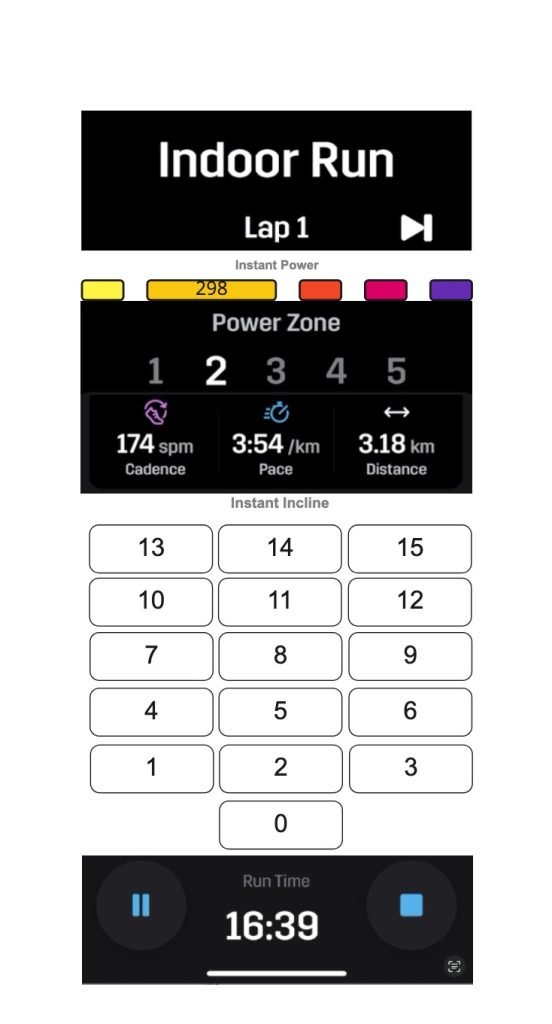
    What I want is a swipe-free interface something like this. I know it’s Frankenstein’s monster but I hope it gets the point across.

    Another option would be 0-9 + an enter button. So you can go to 12% incline by pressing 1, 2, then enter.

    Anywho. That’s me for my very specific feature request in the guise of helping me safely run on a treadmill.

    (Cross posted from Stryd Club Forum, since I needed to host the video somewhere.)

  • Welcome to roughdata!

    Turns out, I do need a blog, and it also turns out having backups of my blog posts is a good idea. So here we are.

    That said, this particular recreation of this blog will be done using the Wayback machine because I actually can’t find my old svbtle hosted blog backups. Glad I was worthy for the archiving, Internet Archive

    I’ll post the old stuff as I determine its suitability for the Internet.